

Ad viewability directly determines how much advertisers pay for your inventory. Publishers with viewability rates above 70% consistently command higher CPMs in programmatic auctions — because advertisers bid more aggressively for impressions they know will be seen. The two biggest levers publishers control are ad placement layout and lazy loading configuration. To stop leaving money on the table, finding the best ad placement for viewability is not just an aesthetic choice; it is a critical, data-driven science that protects your programmatic yield.
Every month, publishers lose a measurable percentage of potential CPM not because of low traffic, but because of invisible layout errors. This playbook covers exactly how to reverse that trend and hit the 70%+ target. We break down the latest IAB standards, proven layout strategies, and the real-world revenue trade-offs of lazy loading. More importantly, we explore how integrating these tactics with a unified header bidding setup amplifies every single viewability gain. Whether you are launching a site redesign or refining your overall yield optimization strategies for publishers, these actionable steps will help you turn optimized ad units into immediate revenue uplift.
Contents
- 1 KEY TAKEAWAYS (TL;DR)
- 2 What Is Ad Viewability and Why Does It Directly Affect Your CPM?
- 3 IAB-Aligned Best Ad Placements for High Viewability Scores
- 4 Lazy Loading: The Double-Edged Sword AdOps Managers Must Master
- 5 How Header Bidding Amplifies the Value of Every Viewability Gain
- 6 Measuring and Optimizing Viewability: The Practical AdOps Checklist
- 7 Frequently Asked Questions
KEY TAKEAWAYS (TL;DR)
- The IAB/MRC standard defines a viewable display ad as ≥50% of pixels visible for ≥1 continuous second; for video, the threshold is ≥2 seconds.
- Ad placement position is the single biggest controllable factor in viewability — the “just below the navigation bar” position consistently outperforms above-the-fold header units.
- Lazy loading improves page speed and SEO signals, but misconfigured lazy loading on above-the-fold units actively reduces viewability and hurts CPM.
- Publishers who improve viewability from 40% to 70% can expect RPM uplift of approximately 30%, driven by increased bid competition at the SSP level.
- Header bidding with 30+ SSP connections amplifies viewability gains — higher viewability inventory attracts more bidders, pushing CPMs to their true market rate.
What Is Ad Viewability and Why Does It Directly Affect Your CPM?
Ad viewability measures whether an ad was actually seen by a user, not merely served to a page. Under the IAB/MRC standard, a display ad is “viewable” when at least 50% of its pixels appear on-screen for at least one continuous second. Higher viewability rates signal inventory quality to demand-side buyers, driving stronger bid competition and higher CPMs.iab
Advertisers no longer pay premium rates for ads that render at the bottom of a page nobody scrolls to. Understanding how viewability works mechanically in programmatic auctions is the first step to taking back control of your ad revenue.
The Difference Between a Served Impression and a Viewable Impression
A served impression counts every time an ad loads in a browser — including ads that appear below the fold and are never scrolled into view. A viewable impression only counts when the user actually sees it. Advertisers increasingly buy on viewable CPM (vCPM), which means un-viewable inventory earns less, regardless of traffic volume.sevio
Think of a served impression like sending a letter. A viewable impression is confirming the recipient actually read it.
In the early days of ad tech, publishers were paid for every served impression. Today, the ecosystem operates on strict quality metrics. Buyers optimize their campaigns using vCPM (viewable CPM) to ensure they get actual return on their ad spend. If your website serves millions of impressions but users scroll past them before they load, advertisers will categorize your inventory as low-performing. Consequently, they will lower their bids or stop bidding entirely on your ad slots.
How Viewability Rate Translates to Revenue: The Bid Density Mechanism
Programmatic advertisers set targeting rules that filter out low-viewability inventory. When your viewability rate crosses key thresholds — particularly 60% and 70% — more DSPs include your inventory in their bidding eligibility. More eligible bidders means more competition per impression, which mechanically raises your floor-cleared CPMs.pubstack+1
The mechanism linking viewability to revenue is straightforward: Viewability → Bid Density → CPM → RPM.
When demand-side platforms (DSPs) evaluate your ad request, they look at historical viewability data. If a specific ad placement has a low viewability rate, premium buyers filter it out. However, when you optimize your layout, you invite more buyers back to the table. This increases your Bid Density (the number of advertisers actively competing for a single impression). High bid density forces buyers to bid higher to win, directly increasing your CPM.
A publisher moving from 40% to 70% viewability does not just improve a metric — they unlock a new tier of advertiser demand that was previously filtering them out.
Hitting these benchmarks has a profound impact on your bottom line. Industry data shows that improving viewability to optimal levels can generate an RPM uplift of approximately 30%. For most publishers, a 70% viewability rate is a highly reasonable target, while top-tier publishers often push their layouts to exceed 75%.nextmillennium+1
To understand the exact technical parameters defining these metrics, publishers should refer to the official IAB MRC Viewable Ad Impression Measurement Guidelines. Furthermore, as advertisers shift focus from basic visibility to active user engagement, staying updated with the guidelines will help you future-proof your monetization strategy.
IAB-Aligned Best Ad Placements for High Viewability Scores
The highest-viewability placement on a standard web page is not the leaderboard at the very top of the page — it is the unit positioned just below the navigation bar. This position captures users as they begin engaging with content, before scroll fatigue sets in, and consistently outperforms classic “above the fold” header units in viewability benchmarks.yieldbird
To maximize your programmatic ad revenue, you must align your layout strategy with user behavior. Strategic placement bridges the gap between what users want (to read your content) and what advertisers want (sustained attention).
Debunking the “Above the Fold Always Wins” Myth
Above-the-fold (ATF) does not automatically mean high viewability. Header units that load before page content often sit in positions users scroll past immediately. Research shows that the unit placed just below the navigation bar — where content begins — achieves the highest sustained viewability because users pause there to read.
Historically, AdOps teams defined Above-the-Fold as the absolute best real estate. By definition, ATF is simply the portion of a webpage visible without scrolling. However, modern users are trained to scroll instantly to find the article body. If your largest ad unit sits at the very top of the page, it often loads just as the user scrolls past it, registering as an un-viewed impression.linkedin
While ATF units average approximately 73% viewability, this number drops significantly if the ad is not placed at the actual content entry point. To understand where your specific high-value zones are, mapping user attention is critical.yieldbird
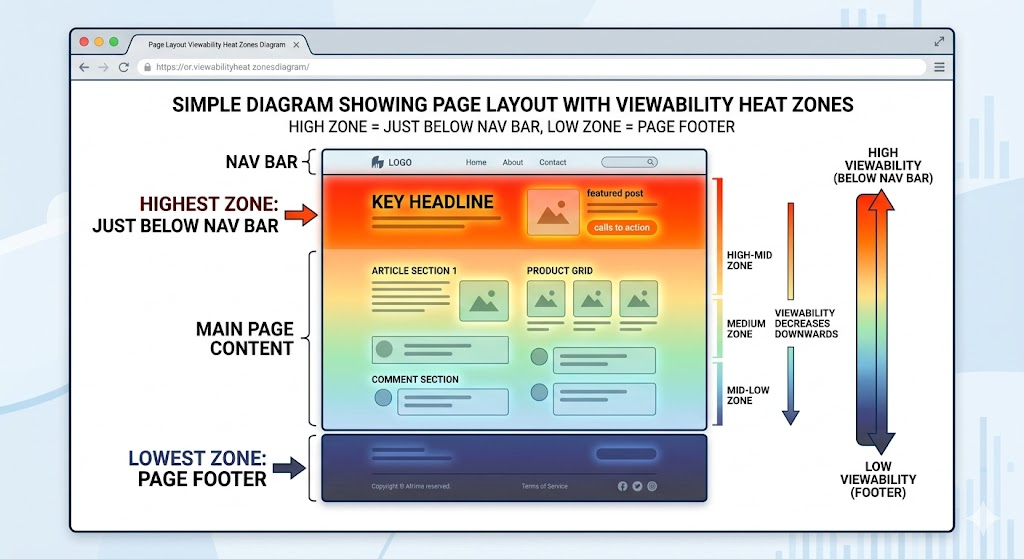
The Publisher Placement Priority Matrix
Effective ad layout strategy requires matching placement position to expected viewability outcome — then selecting the right ad size to maximize both viewability and CPM. The most reliable high-viewability placements are: (1) just below the navigation bar, (2) in-content after the first 2–3 paragraphs, and (3) sticky sidebar or sticky footer units.
Small layout tweaks yield massive programmatic gains. For example, moving a primary ad unit from the absolute top header to just below the navigation bar can trigger a 19% viewability improvement. Furthermore, contextual placements inside engaging content consistently maintain advertiser attention.
Placement Comparison Table:
| Placement Position | Expected Viewability | Best Ad Size | Notes |
| Just below navigation bar | 75–85% | 728×90, 970×250 | Best performing overall. |
| In-content (after para 2–3) | 70–80% | 300×250, 300×600 | High engagement zone. |
| Sticky sidebar | 80–90%+ | 160×600, 300×250 | Sustained visibility while user scrolls. |
| Sticky footer (mobile) | 85–95% | 320×50, 375×50 | Top mobile viewability unit. |
| Standard above-fold header | 55–70% | 728×90 | Often overestimated. |
| Mid-page (between sections) | 60–75% | 300×250 | Highly variable by content depth. |
| Below-fold sidebar | 30–50% | 300×600 | Needs lazy loading. |
| Page footer | 20–40% | 728×90 | Lowest viewability position. |
Ad Size Selection for Viewability Optimization
Ad size directly impacts viewability because larger units require more pixel coverage to meet the 50% threshold. In practice, mobile-optimized units (375×50, 360×50) achieve the highest viewability rates globally because they are purpose-built for the viewport constraints of mobile screens — the dominant traffic source for most publishers.nextmillennium+1
Ad sizes are not created equal when it comes to rendering speed and screen real estate.
- Top performers: 375×50 (~94% viewability) and 360×50 (~92% viewability) dominate because they load instantly and stay visible.lunamedia+1
- The versatile standard: The 300×250 medium rectangle remains strong across both desktop and mobile due to its compact footprint.
- The high-CPM trade-off: Large formats like the 970×250 billboard command premium CPMs but are much harder to make viewable. If users scroll quickly, a 970×250 unit will fail to meet the 50% pixel requirement.yieldbird
Always align your ad sizes with the IAB New Ad Portfolio. Formats that follow LEAN principles (Light, Encrypted, Ad choice supported, Non-invasive) load faster and inherently correlate with higher viewability scores.iabtechlab
Sticky Ads: The Viewability Multiplier
Sticky ad units — those that remain fixed in the viewport as users scroll — are the most reliable way to achieve sustained viewability rates above 80%. Because the ad stays visible throughout the user’s reading session, it accumulates viewable time well beyond the 1-second IAB threshold, making it premium inventory for time-sensitive brand advertisers.
When deploying sticky ads, balance revenue with user experience. Common deployments include desktop sidebars, mobile footers, or in-content anchors. However, you must adhere to UX guidelines. For instance, IAB guidelines strongly recommend limiting sticky footer heights (e.g., max 30px on certain mobile layouts) to prevent intrusive, penalized experiences.froggyads
Technical Note: Combining sticky ads with ad refresh creates a compounding revenue effect. By setting an ad to reload after 30–60 seconds of active in-view time, you multiply your viewable impression volume per session. Always ensure your refresh configuration strictly complies with individual advertiser policies.
Lazy Loading: The Double-Edged Sword AdOps Managers Must Master
Lazy loading delays an ad from loading until a user is about to scroll into its viewport. When configured correctly, it improves page speed, reduces bandwidth waste, and can increase viewability for below-the-fold units. When misconfigured — especially on above-the-fold placements — it actively reduces viewability and revenue, particularly for high-value Tier 1 traffic.
While lazy loading is a standard practice in modern web development, its application to programmatic ad units requires precision. A blanket approach to lazy loading will almost certainly damage your yield.
Why Lazy Loading Exists and What It Does Well
Lazy loading was adopted primarily to improve page load speed — a Core Web Vitals signal that affects SEO rankings. By not loading off-screen ads until needed, publishers reduce initial page weight, improve Largest Contentful Paint (LCP) scores, and provide a faster experience for users on mobile connections. This speed improvement indirectly supports ad revenue by protecting organic traffic.
Think of lazy loading like a restaurant that only prepares dishes when the customer orders, rather than cooking everything at once and letting it sit on the counter.
By deferring below-the-fold ad requests, you ensure the browser dedicates its initial processing power to rendering your core content. This protects your SEO footprint. Additionally, lazy loading reduces ad requests for impressions that would never be viewed. This improves your overall fill rate quality, which strengthens your relationships with demand-side platforms (DSPs) over time.
The Danger Zone: When Lazy Loading Hurts Revenue
Aggressive lazy loading — where ads load only when the user has already scrolled past them — is a documented cause of revenue loss for Tier 1 US traffic. High-intent users on fast desktop connections bounce quickly; if ads haven’t loaded, those impressions are lost entirely. The r/adops community confirms this is a real and frequent misconfiguration mistake.reddit
There are three primary failure modes where lazy loading actively destroys ad revenue:
- The rootMargin is set too small: The ad request fires too late, causing the user to scroll past a blank space before the creative renders.
- Applied to Above-the-Fold (ATF) units: This drops viewability instantly, as the viewport is already active but the ad is artificially delayed.
- No timeout fallback: If a user scrolls erratically, the lazy load trigger might fail to fire, leaving ad slots permanently unfilled.
This is not just a theoretical risk. In a recent r/adops thread discussing whether aggressive lazy loading hurts revenue for US traffic, AdOps managers confirmed that misconfigured triggers directly caused measurable drops in their daily CPMs.
The golden rule of ad layout optimization: NEVER apply lazy loading to above-the-fold ad units.
Transparency Note: This is a documented trade-off — lazy loading is not inherently bad, but implementation quality determines whether it helps or hurts. PubPower’s AdOps team configures this dynamically per-publisher to ensure viewability is never sacrificed for marginal speed gains.
The Correct Configuration Framework: Lazy Loading by Position
The correct lazy loading strategy treats page position as the deciding factor. Above-the-fold units should load immediately with no delay. Mid-content units benefit from a rootMargin of 150–300px (load slightly before they enter the viewport). Below-the-fold units can use standard lazy loading with a 300–500px rootMargin to ensure they are ready when the user arrives.
To execute this effectively, publishers should map their configuration directly to the ad unit’s location on the page:
| Ad Position | Lazy Loading? | Recommended rootMargin | Reason |
| Above the fold (ATF) | No | N/A — eager load | Viewability is immediate; any delay costs impressions. |
| Just below nav bar | No | N/A — eager load | Highest-value position; must load instantly. |
| In-content (para 2–3) | Optional | 150–200px | User may scroll past quickly on mobile. |
| Mid-page | Yes | 200–300px | Ample scroll time; speed benefit outweighs risk. |
| Sidebar (below fold) | Yes | 300px | Low-risk position; speed benefit is significant. |
| Footer | Yes | 300–500px | Almost always BTF; lazy loading is highly appropriate. |
Lazy Loading + Ad Refresh: The Compounding Strategy
Combining lazy loading with in-view ad refresh is an advanced technique that increases total viewable impressions per session without adding new placements. The key rule: only refresh an ad when it is actively in the viewport — never refresh off-screen. This satisfies advertiser brand safety requirements while maximizing the viewable impression count from each session.headerbidding
An effective in-view refresh timer pauses the moment a user scrolls away from the ad unit, and resumes only when the ad returns to the viewport. This guarantees that your refreshed impressions maintain a near-100% viewability rate.
However, compliance is critical. You must adhere strictly to individual SSP policies. Many premium exchanges require a minimum of 30 seconds of active in-view time before an ad can be refreshed. Violating these terms can lead to domain blocking.
Configuring these triggers manually across 30+ demand partners can quickly overwhelm an in-house team. Want a pre-configured lazy loading setup that is already optimized for your specific traffic? See exactly how much revenue you’re leaving on the table when PubPower handles this automatically.
How Header Bidding Amplifies the Value of Every Viewability Gain
Viewability optimization and header bidding are multiplicative, not additive. When a publisher improves viewability, more DSPs bid on their inventory. When those DSPs compete through a header bidding wrapper with 30+ SSP connections — rather than a single-demand waterfall — the CPM premium for high-viewability inventory is captured at its true market rate rather than settled at a single SSP’s offer.
Optimizing your layout is only half the battle. If your demand stack is not built to recognize and reward that optimization, your effort is wasted. This is where advanced programmatic technology comes into play.
Why High-Viewability Inventory Is Worth More in a Competitive Auction
In a waterfall setup, high-viewability inventory is sold at the first SSP’s price — even if competing SSPs would have bid 30–40% higher. Header bidding solves this by presenting the impression to all SSPs simultaneously, ensuring the true market price for premium viewable inventory is captured. The combination of improved viewability and header bidding access creates the largest revenue uplift publishers can achieve without adding traffic.
A legacy waterfall setup evaluates demand partners sequentially. It relies on historical averages rather than real-time value. If your first-in-line ad network bids $1.50 on a highly viewable impression, the auction ends. You never find out that another network further down the chain was willing to pay $2.50.
Think of a unified auction (header bidding) like a live stock market for your ad inventory. Every buyer sees the impression at the exact same time. When your viewability metrics are strong, premium buyers fight for that placement. Industry data proves this compounding effect: publishers who combine in-view layout optimization with a robust header bidding setup have seen viewability jump by 43%, triggering a 70% increase in eCPM, and ultimately a 77% surge in overall RPM.adsparc
PubPower’s Viewability-to-Revenue Pipeline: 30+ SSPs, One Dashboard
PubPower connects publishers to 30+ SSPs — including Google, PubMatic, Magnite, and Amazon — through a single self-serve dashboard. When viewability scores improve, publishers can see immediately in the unified real-time report which SSPs are responding with higher bids, which are increasing fill rate, and what the aggregate revenue impact is — no guesswork, no black box.
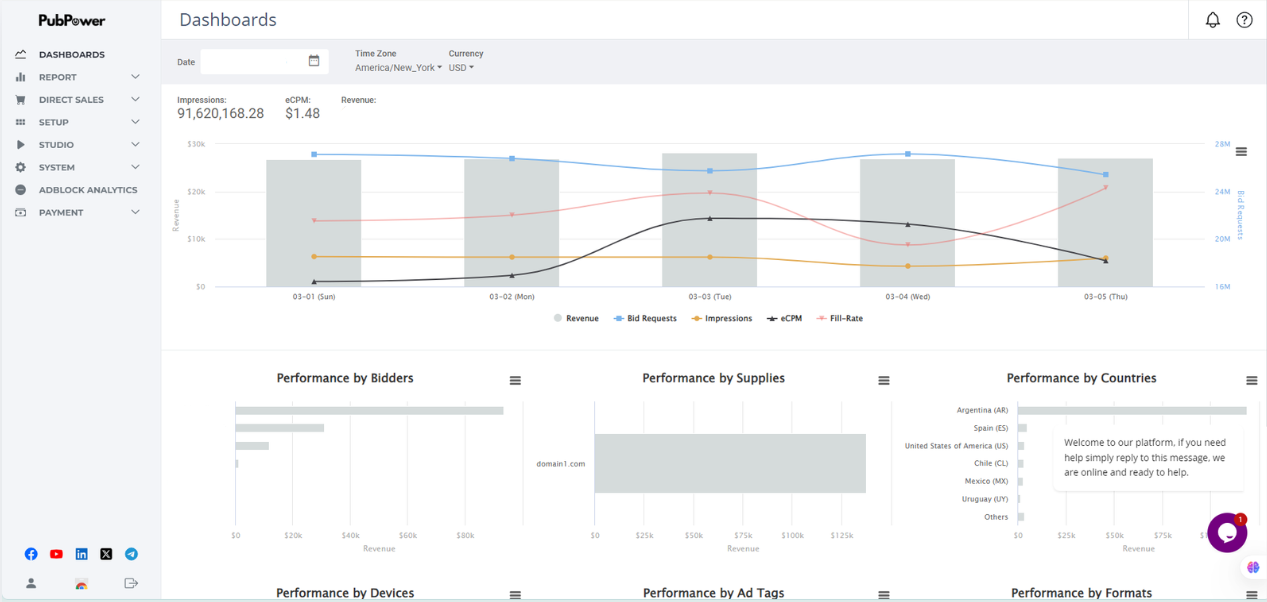
Your monetization platform should serve as a verification layer. When you push a layout change live, you should not have to wait until the end of the month to see if it worked. PubPower’s unified reporting eliminates the industry’s notorious black box by consolidating performance data from all 30+ SSPs into one interface. Furthermore, as a Google Certified Publishing Partner (GCPP), PubPower operates under strict standards of transparency and technical excellence, ensuring your ad stack is directly aligned with Google’s best practices.
When you empower AdOps teams with real-time data, the results speak for themselves.
Measuring and Optimizing Viewability: The Practical AdOps Checklist
Viewability optimization is not a one-time setup — it requires a quarterly audit cycle. The core measurement workflow is: track viewability rate and vCPM per placement in Google Ad Manager, identify underperforming units (viewability below 50% is a red flag requiring immediate action), test one layout change at a time, and measure RPM impact over a 14-day window to account for programmatic seasonality.
Without a structured process, layout changes become guesswork. To build a sustainable ad business, you must treat your ad inventory like a product that requires continuous iteration and precise measurement.
Key Metrics to Track (Beyond Basic CPM)
Publishers who optimize solely for CPM often miss the fuller revenue picture. The four metrics that together reveal whether a viewability strategy is working are: Viewability Rate (%), vCPM (CPM on viewable impressions only), Bid Density (average number of bidders per impression), and Fill Rate. Viewability rate drives bid density; bid density drives vCPM; vCPM combined with fill rate determines actual RPM.
Tracking CPM in isolation is dangerous. A placement might have a high CPM but a terrible fill rate because buyers are filtering it out due to low viewability.
To diagnose your revenue health accurately, you must monitor these interconnected metrics:
| Metric | What It Measures | Healthy Benchmark | Action if Low |
| Viewability Rate | % of impressions that meet IAB/MRC threshold. | ≥70% (target).nextmillennium | Audit placement positions immediately. |
| vCPM | CPM calculated on viewable impressions only. | Varies by vertical; track trend. | Improve viewability to unlock higher vCPM tiers. |
| Bid Density | Avg. SSP bidders per impression. | Higher is always better. | Add SSP connections; improve viewability. |
| Fill Rate | % of ad requests resulting in a paid impression. | ≥85% for header bidding. | Check floor prices and SSP timeouts. |
| RPM | Revenue per 1,000 page views. | Baseline + 30% = optimized target.pubstack | Combine all above levers for maximum yield. |
The Quarterly Viewability Audit Framework
A quarterly viewability audit takes approximately two hours and follows a consistent process: pull per-placement viewability data from GAM, identify the three lowest-performing units, implement one change per unit (position, size, or lazy loading config), and run a 14-day measurement window. This structured approach prevents the common mistake of changing too many variables simultaneously and losing attribution.
If you change your header unit, your sidebar unit, and your lazy loading rules on the same day, you will never know which change drove your revenue up (or down). Discipline is key.
Quarterly Audit Checklist:
- Pull viewability report by placement unit from Google Ad Manager (using Active View metrics).
- Flag any unit below 50% viewability — this requires immediate corrective action.
- Check lazy loading configuration: confirm absolutely no ATF units have lazy loading enabled.
- Review sticky ad compliance: ensure they adhere strictly to IAB size and UX guidelines.
- Test exactly one placement position change per underperforming unit.
- Verify that ad refresh is set exclusively to an in-view-only trigger.
- Compare vCPM before and after changes over a minimum 14-day measurement window.
- Check SSP-level data in your unified dashboard: identify which SSPs are responding to viewability improvements with higher CPMs.
Want PubPower’s AdOps team to run this exact audit on your site and find the hidden revenue you are missing? -> Book a Demo
Frequently Asked Questions
What is a good ad viewability rate for publishers?
A viewability rate of 70% is a widely accepted target benchmark for most publishers. Top-tier publishers often aim for 75% or higher. Any ad placement consistently falling below the 50% viewability threshold is a red flag that requires immediate layout optimization, as advertisers will actively filter it out.
Does ad placement above the fold always guarantee high viewability?
No, above-the-fold (ATF) ad placements do not guarantee high viewability. If an ad sits at the absolute top of the page (like a traditional header leaderboard), users often scroll past it to reach the content before the ad fully renders. The highest viewability is typically achieved just below the navigation bar.
How does header bidding improve revenue for highly viewable ads?
Header bidding amplifies the value of high viewability by presenting your premium inventory to dozens of demand partners simultaneously. Instead of selling a highly viewable impression to the first bidder in a waterfall setup, a unified auction forces 30+ SSPs to compete, ensuring you capture the true maximum CPM.
Does aggressive lazy loading hurt programmatic ad revenue?
Yes, aggressive lazy loading can severely hurt ad revenue, particularly with fast-scrolling Tier 1 traffic. If the lazy load trigger fires too late, the user scrolls past a blank space, resulting in a lost impression. Lazy loading should never be applied to above-the-fold units and must be carefully configured for mid-page placements.
What is the difference between an ad impression and a viewable impression?
A served ad impression simply means the ad was loaded by the browser, regardless of where it is on the page. A viewable impression means the ad actually appeared on the user’s screen. Under IAB standards, at least 50% of the ad’s pixels must be visible for at least one continuous second to count as viewable.